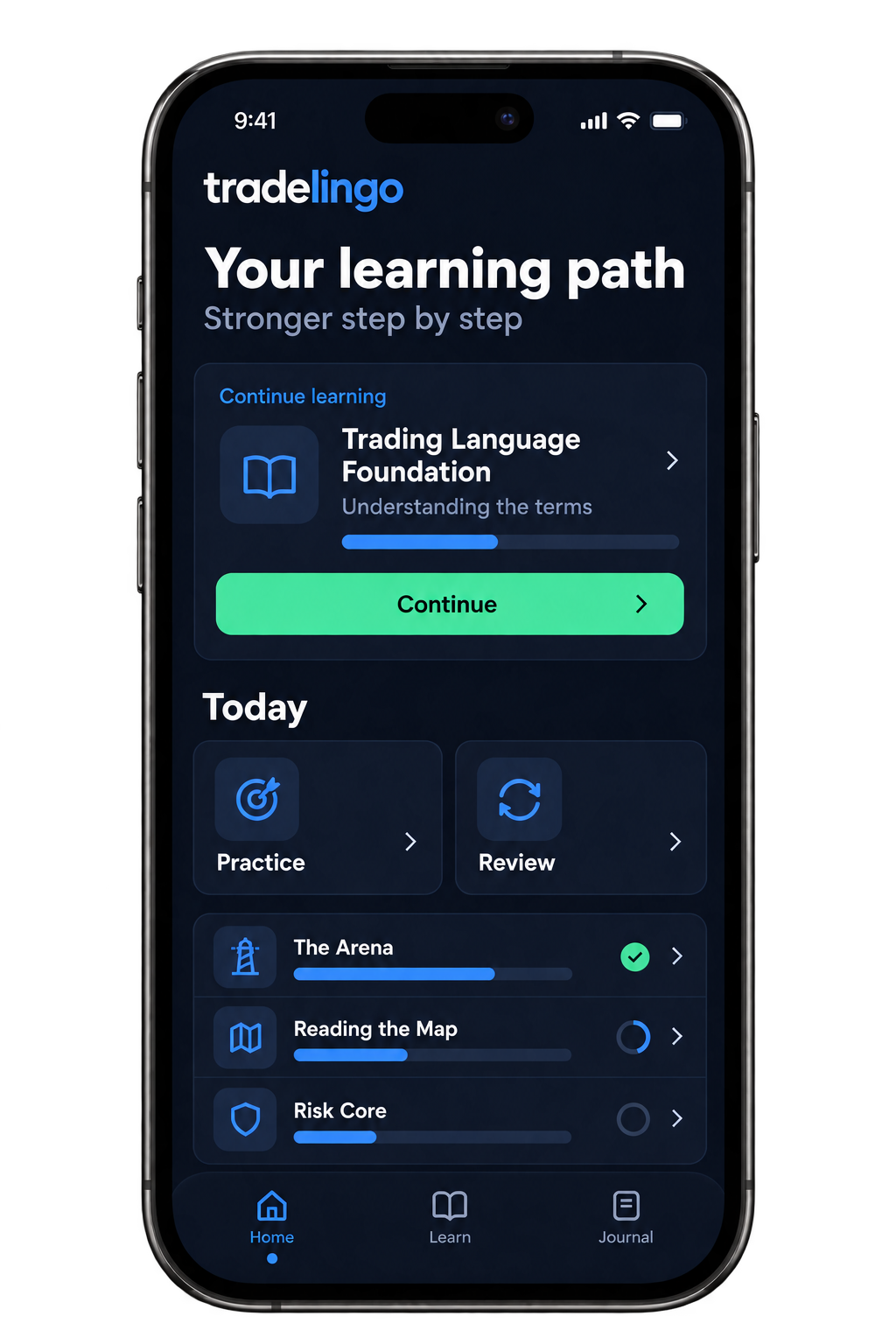
Trading starts with understanding

Learn the language.
Train your
discipline.

Build your foundations as a trader, on your phone. Install Tradelingo as a web app on your home screen and develop your knowledge and discipline through short lessons, practice and review.

Add Tradelingo to your home screen. Open your learning space from the app icon.

Concept preview of the learning experience: Tradelingo
Concept preview of the learning experience
01Understand the basicsOne topic at a time
02Put it into practicePractice thoughtful decisions
03Build a routineMake time for review

Complete foundations, one small step at a time.

106lessons9 vocabulary lessons + 97 core lessons
46interactive widgets35 distinct widget types
331quiz questionsAcross the lesson collection
10modules9 core modules + vocabulary foundation

73 trading terms in Trading Language Foundation.

≈ 2.4 hoursestimated reading time · about 146 minutes
≈ 1–2 minaverage reading time per lesson
3–5 mintarget time for your daily warm-up

Reading time is estimated at 200 words per minute for lesson text, objectives, examples, practice prompts and bridge text. Widgets, quizzes, review and independent practice take additional time. Your total learning time depends on your pace.

How to get started

Your learning space.
On your home screen.

Install Tradelingo as a web app on your phone. Open the app in your browser, add it to your home screen and start your next lesson from the Tradelingo icon.

iPhone

Safari

  1. Open tradelingo.riskeys.trade in Safari on your iPhone. Log in or create an account.
  2. Open the browser menu and tap Share. Choose Add to Home Screen.
  3. Turn on Open as Web App if that option appears. Tap Add.
  4. Open Tradelingo using the new icon on your home screen.
View the browser guide

Android

Chrome

  1. Open tradelingo.riskeys.trade in Chrome on your Android phone. Log in or create an account.
  2. Open the three-dot menu beside the address bar.
  3. Choose Add to home screen, then Install if that option is available.
  4. Open Tradelingo using the new icon on your home screen.
View the browser guide

Install from the learning space after logging in. If you only see “Create shortcut”, it adds a shortcut to the app instead. Menu options vary by phone and browser version.

Try it yourself

One concept.
A first step.

Learning starts with a short question, your own answer and a clear explanation. Try this sample before you move on.

A first stepSample lesson

TRADING LANGUAGE FOUNDATION

Do you know the difference?

What does the term “spread” mean?

Understand · practice · review

Knowledge is the starting point

Learning to trade well
starts with you, too.

You can understand a concept and still act on impulse. Tradelingo connects what you learn with the habits behind your decisions.

LEARN

A clear next step

Follow a structured learning path. Pick up where you left off and build your understanding before moving on.

PRACTICE

From recognition to application

Test your understanding through practice and revisit topics that need attention. Learning becomes more than just reading.

REFLECT

Focus on your behavior

Use your journal and review your progress. Reflect on discipline, emotions and the choices you make as a trader.

Your learning path

Understand first.
Then build on it.

Nine modules, with a separate vocabulary foundation to start. From the language of trading to risk, execution and behavior. Each step builds on your foundations.

START WITH THE LANGUAGE

Trading Language Foundation

Get familiar with the terms you encounter in lessons and in the market. A clear starting point before you go deeper.

  1. M1

    The Arena

    Get to know the market and your role as a trader.

  2. M2

    Reading the Map

    Build your foundations in reading charts.

  3. M3

    Risk Core

    Put risk management at the center of your process.

  4. M4

    Price Action

    Learn to observe what price is doing.

  5. M5

    Smart Money

    An elective to deepen your understanding.

  6. M6

    Execution

    Practice putting your plan into action.

  7. M7

    Psychology

    Recognize emotions and behavior in your decisions.

  8. M8

    Money Management & Performance

    Reflect on your capital and your process.

  9. M9

    Strategy Lab

    Bring the pieces together into an approach.

Before you begin

A few things to know.

How do I install Tradelingo on my phone?

Open the learning space in Safari on iPhone or Chrome on Android. Add Tradelingo to your home screen from the browser menu. Follow the steps above; installation happens on your phone, through your browser.

Who is Tradelingo for?

For traders who want to build their foundations and learn to act more deliberately. Start with the terminology, then develop your knowledge, risk awareness and habits.

What can I do in the app?

Follow lessons, complete exercises, review earlier topics and track your progress. Your journal helps you reflect on your own behavior.

Do I need an account?

Yes. An account keeps your learning path and progress personal. “Start learning” takes you to registration; “Log in” takes you directly to sign-in.

What languages are the lessons available in?

The app has Dutch and English interfaces. The main modules are currently in Dutch; Trading Language Foundation is available in both languages.

Does Tradelingo provide trading signals?

Tradelingo focuses on education and behavior: learning to understand, practice and reflect for yourself. It makes no promises of income or trading results.

Your next step

Start with stronger foundations.

Give your knowledge and discipline the attention they deserve.

Install on your phone